THE SHORT VERSION
- The accounts that cost you clients are the ones that fail quietly: a workflow that stops firing or a number that drops at the carrier never raises an error you would see by logging in.
- You have four honest options: manual spot-checks, GoHighLevel's native alerts, a heartbeat workflow that tests the critical path on a timer, and a managed desk that watches the fleet for you.
- The right choice is set by account count, not by budget: a disciplined spot-check holds to about three accounts, native alerts and a heartbeat carry you into the teens, and past that you are buying someone else's attention.
- Native error notifications miss the two failures that hurt most, carrier-level message drops and an A2P campaign back in review, because the workflow still reports success.
- Monitoring is cheaper than one churned client: a $1,000-a-month retainer lost to a nine-day silent failure is $12,000 a year, against a fleet check that costs a fraction of that.
The text came in at 4:50 on a Thursday. “Are we still sending reminders? My Friday column is empty and the front desk says the phone has been quiet all week.” You open her sub-account. Nothing looks wrong. The workflow is published, the calendar is connected, the automation history shows runs going out. It takes twenty minutes of digging before you find it: her A2P campaign went back into review nine days ago after a wording change, and every appointment reminder since has been logged as sent and quietly dropped at the carrier. Nine days of reminders, gone. You found out because a client with an empty Friday finally picked up the phone.
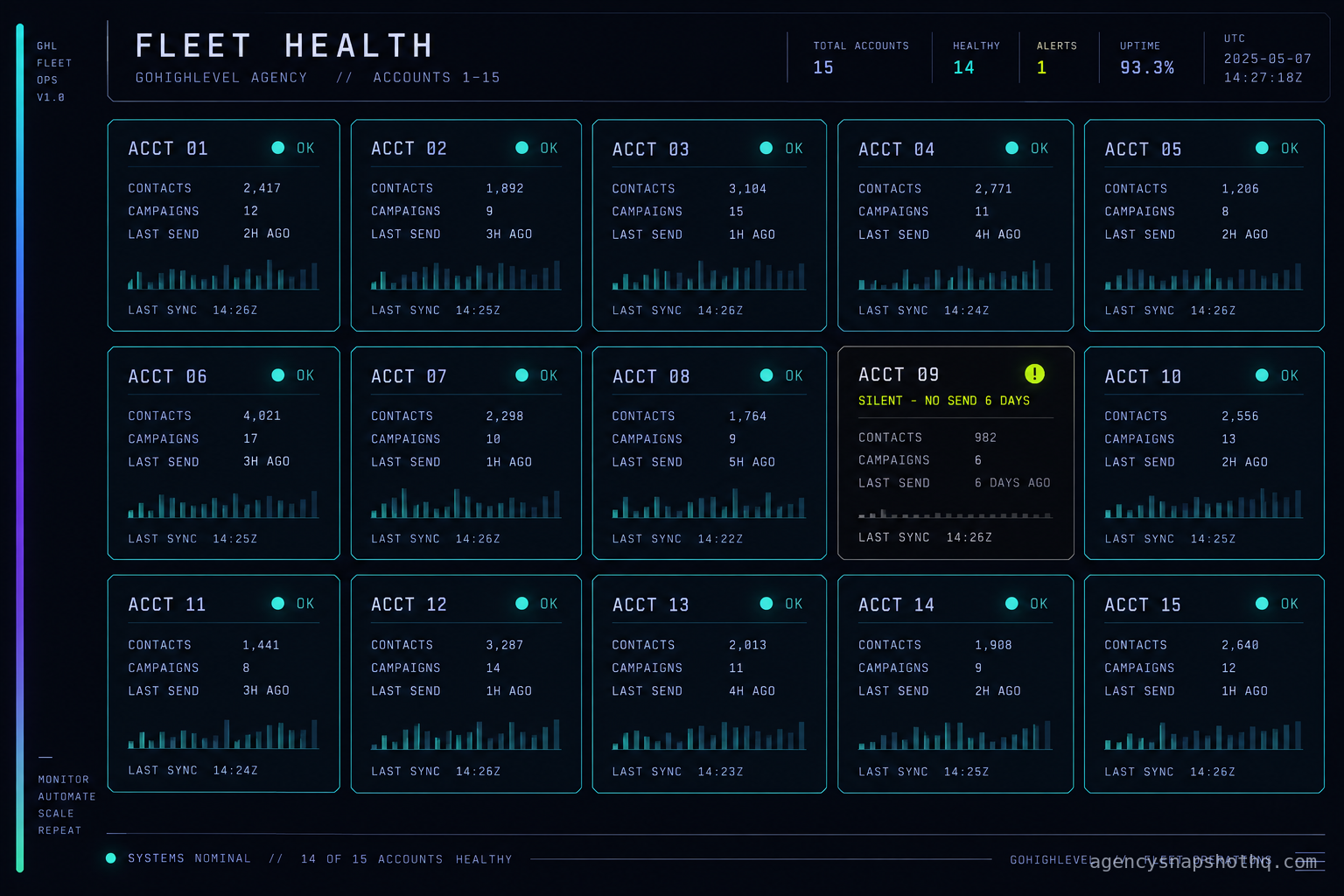
Now multiply that by the number of accounts you run. Seven live sub-accounts? Eleven? You looked at three of them this morning because they happened to be on your mind. The other eight you have not opened in a week. You do not know, right now, this second, whether any of them are doing what hers did. That gap is the whole subject of this briefing. Not how to fix a broken account. How to be the one who knows an account is broken before the client does.
The decision underneath it is not really a tooling question, it is a question of whose attention is on the fleet. There are four honest answers, they suit different account counts, and the wrong one for your size is either a weekend you keep losing or a failure you keep missing.
What a silent failure actually is
Most things that break in GoHighLevel break loudly. A workflow with a bad configuration throws a red error. A form that lost its mapping stops creating contacts and you notice the empty list. A funnel page that fell over returns an error you can see. Those are the failures people build dashboards for, and they are not the ones that cost you clients, because they announce themselves.
The dangerous failures are the ones where the system still thinks it is working. The workflow runs. The action reports success. The history fills with green. And nothing actually reaches the person it was meant for. A silent failure is any break that leaves the automation history looking healthy while the outcome never happens, and GoHighLevel is full of places where that gap can open.
The clearest example is the one in the scene. GoHighLevel can show that a text was accepted by the messaging provider, and that is not the same as the recipient’s carrier accepting it. The message can be filtered or rejected later in the route, and one third-party teardown of GoHighLevel message delivery puts this plainly: an accepted message can still be blocked downstream, and you only see it in the underlying phone log (consultevo, why GoHighLevel SMS campaigns keep getting blocked). The workflow that sent it records a clean send. The reminder never arrives. The calendar empties one no-show at a time.
Email has the same shape. The nurture campaign fires on schedule, every send logs as sent, and the sending domain quietly fell out of authentication a week ago so every one of them is landing in spam. The automation is not broken. The delivery is, and a working campaign that ends up in the junk folder is a trap worth watching for in its own right.
And there is a third kind, the kind where the workflow was changed and nobody wrote it down. A sub-account gets a quick edit, a condition flipped, a step removed to fix one client’s complaint, and three weeks later nobody can say which accounts carry that edit and which do not. That is drift rather than a hard failure, and it is close enough to this problem that we gave it its own briefing on version drift. The point the two share is the one that matters here: a healthy-looking account and a working account are not the same thing, and the distance between them is exactly what monitoring has to close.
So before you choose how to watch, be precise about what you are watching for. You are not watching for errors. GoHighLevel shows you those already. You are watching for the absence of an outcome while the system insists everything is fine.
Where a sub-account goes quiet
If a silent failure is the absence of an outcome, then monitoring means picking the handful of outcomes that actually pay you and confirming each one still happens. On a typical service-business snapshot there are only a few, and they are the same few on every account, which is what makes a fleet watchable at all.
The first is inbound capture. A lead fills a form or texts the number, and a contact is created and routed. When this breaks, new contacts simply stop appearing, and because an empty list looks like a slow week, it can sit for days. On an intake-driven snapshot like the law firm build, a missed capture is a missed case, which is about the most expensive version of this failure there is.
The second is the booking path. A lead reaches the calendar, picks a slot, and the appointment lands on the right connected calendar. This is where a reassignment mistake hides: the calendar still books, but the slots drop into a calendar nobody reads, so from the client’s chair the phone just went quiet. On an appointment-heavy snapshot like the dental practice build, this single path is most of the account’s value.
The third is the reminder and recovery path, the one from the scene. The confirmation goes out, the reminder goes out the day before, and when someone does not show, the no-show recovery sequence tries to rebook them. The client’s whole case for the system, the 70 percent no-show recovery the snapshot is built to target, depends on these messages actually arriving. When they drop at the carrier, the target quietly becomes zero and the history still shows sends.
The fourth is the review and reputation path, the one that is supposed to produce five to ten reviews a month. It fires after a completed job or visit, asks for the review, and routes a happy customer to the public page. When it stalls, nothing alarming happens. The review count simply stops climbing, which is invisible unless you are looking.
Across these paths the failure surface is small and repeatable. A number can go into A2P re-review after a content change, which is what the official registration process does when a campaign’s wording shifts, and GoHighLevel surfaces a failed workflow action as an in-app error notification with the workflow name, the failed action and a timestamp (consultevo, GoHighLevel workflow error alerts). A connected calendar can disconnect when a client changes their Google password. A sending domain can lose its DNS records when the client’s web person “tidies up.” A workflow can be edited into a dead end. Each of these produces a different symptom, and only some of them raise anything you would ever see by logging in. That asymmetry, some failures loud and some silent, is the reason the four monitoring models below are not equally good. They catch different parts of the same small surface.
The four ways to watch a fleet
You have a known, short list of outcomes to confirm, on a growing number of accounts. Here are the four honest ways to confirm them, cheapest-effort first, with what each one really buys.
Manual spot-checks
You log into each account on a cadence and look. Done properly, a spot-check is not a glance at the dashboard: you open the notification centre to clear any workflow errors, you push a test contact through the booking and reminder path, you read the message log for the last few days to confirm sends are being delivered and not just accepted, and you glance at the new-contact count against a normal week. That is the whole job, and it is genuinely effective, because a human doing it will notice the empty calendar that no automated check was told to look for.
Its weakness is not quality, it is arithmetic. A proper pass takes real minutes, those minutes multiply by the number of accounts, and spot-checks are the first thing a busy week deletes. The account you skip is, by the law of these things, the one that failed. Manual checking is the right tool right up to the point where you can no longer honestly promise you will do it.
Native alerts
GoHighLevel will tell you some things if you ask it to. A failed workflow action lands in the account’s notification centre, and you can add an internal notification action to a workflow so that a chosen event emails or messages your team rather than a lead (consultevo, GoHighLevel internal notification workflow). You can wire a notification onto the steps that matter, a new lead that was not routed within an hour, a booking that failed to assign, and have the account itself raise its hand.
This is a real step up from spot-checks because it runs without your attention, and it is close to free once built. Its ceiling is two-sided. First, those error notifications sit inside each sub-account’s own notification centre, so without an internal-notification action pushing them out, nobody sees them until they log in, which is the problem you were trying to solve. Second, and this is the important one, native alerts only fire on failures the platform can see. A message accepted by the provider and dropped at the carrier is not a failure as far as the workflow is concerned, so no native alert fires. The two most expensive silent failures slip straight through.
A heartbeat workflow
This is the one most agencies have never built, and it is the one that fits the fleet. You install a small self-testing workflow in each sub-account: on a schedule, it spawns a test contact, runs it through the critical path exactly as a real lead would go, and checks at the end that each expected step completed. If the test contact did not get its reminder, or the booking did not assign, the heartbeat pings you. It is a canary that walks the path on a timer so you do not have to.
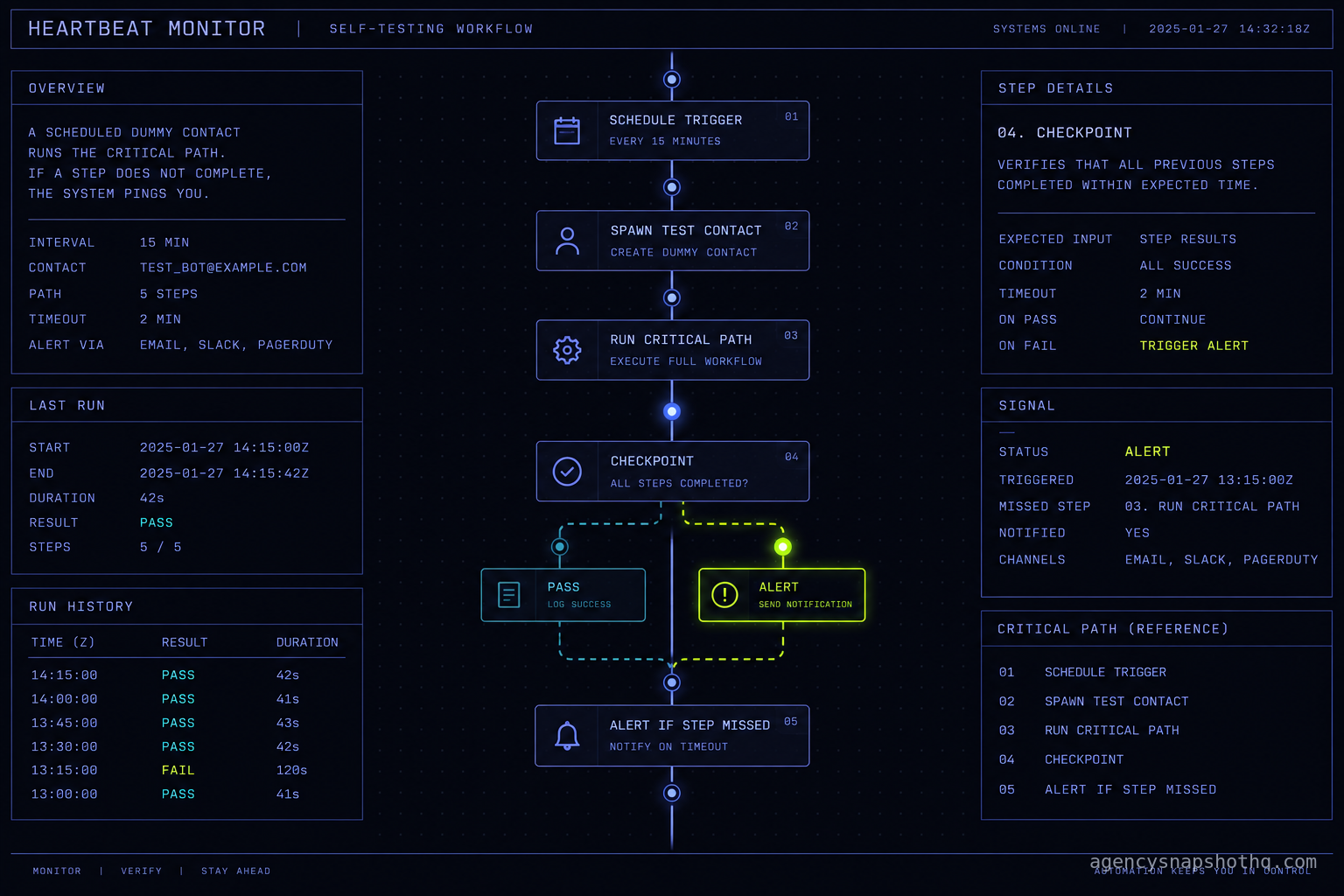
The reason it suits a fleet is that it rides inside the snapshot. Because every account was built from the same snapshot, the critical path has the same shape everywhere, so the heartbeat is one pattern you build once and it reproduces on every account you deploy. The thing it cannot do on its own is confirm carrier-level delivery, because from inside GoHighLevel the test message looks sent. You close that last gap by having the heartbeat check the message log’s delivery status rather than the send status, or by pairing it with a real handset on one test number. For agencies that want this wired across accounts and into their own alerting, that cross-account plumbing is exactly what the systems integration service scopes and quotes.
A managed desk
The fourth option is to make the watching someone else’s standing job. That can be a GoHighLevel VA who runs the spot-check routine across the fleet every morning as part of an hours-based engagement, a periodic professional sweep through the snapshot update service that re-verifies every live account on a schedule, or a continuous managed retainer where a desk watches the fleet and fixes what breaks inside an agreed scope. What you are buying in every case is the same thing: a guarantee that the first person to notice a dead account is not your client.
This is the only model whose detection does not degrade as you add accounts, because the attention is contracted rather than borrowed from your own week. It is also the only one with a monthly line item, which is the honest trade. You are paying to move the risk off your own follow-through and onto someone whose follow-through is the product.
The four, side by side
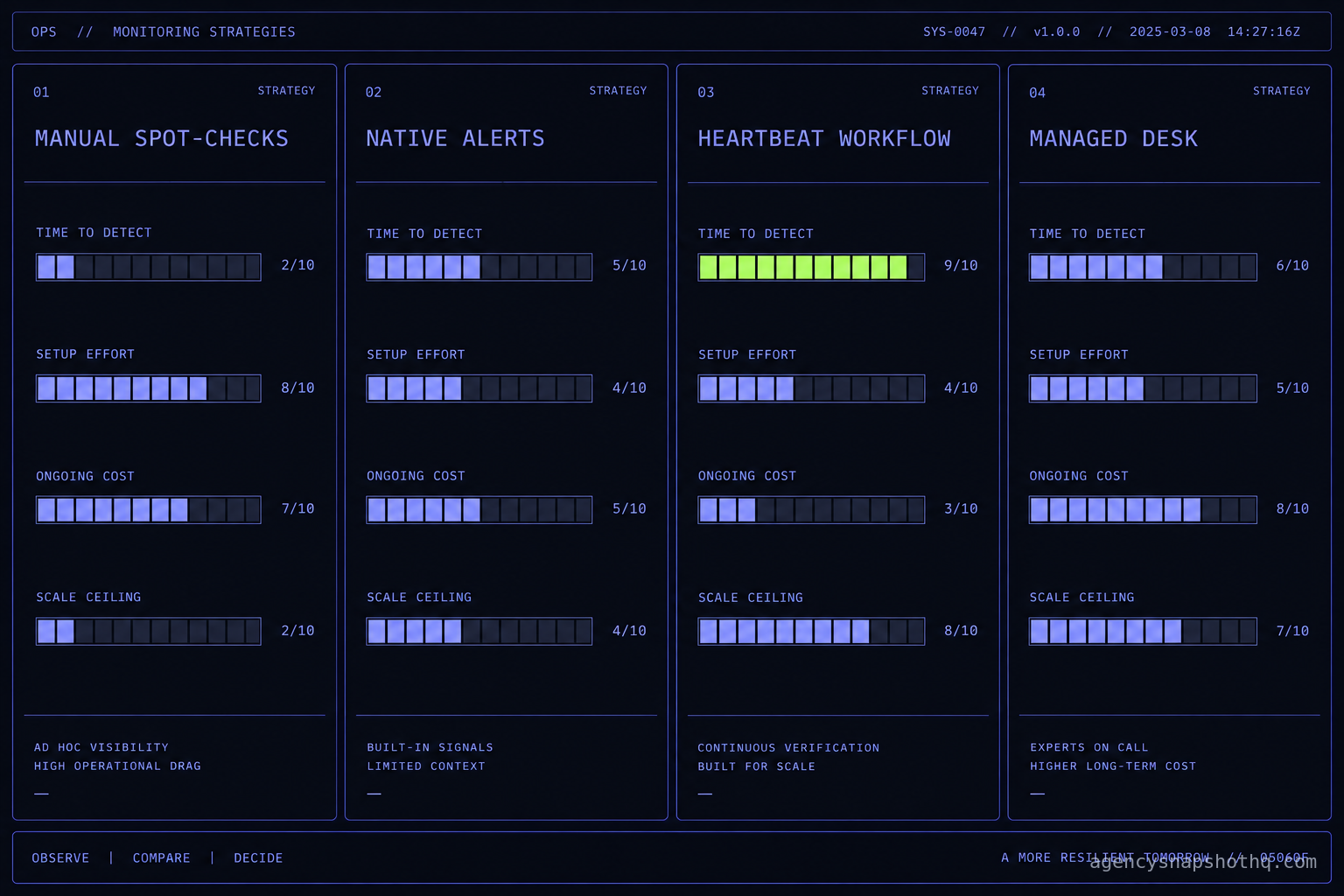
| Criterion | Manual spot-checks | Native alerts | Heartbeat workflow | Managed desk |
|---|---|---|---|---|
| What it catches | Anything a human notices, including the empty calendar | Platform-visible failures: workflow errors, routing misses | A missed outcome on the tested path, on a timer | Everything the model you pair it with catches, reliably |
| Time to detect | As fast as your next check, as slow as your last skip | Near-real-time, on failures it can see | One heartbeat interval | Same business day, by contract |
| Setup effort | None | A few hours once per account pattern | Build once per snapshot, reuse on every account | None of yours |
| Ongoing cost | Your hours, every week, forever | Near zero after setup | Near zero after setup | A monthly fee |
| Holds up to | ~3 accounts before you start skipping | Into the teens, if alerts are pushed out | Into the teens and beyond | No account ceiling |
| False alarms | Low, a human judges | Medium, noisy events nag | Low, if the test path is chosen well | Low, a human triages first |
| Who acts on an alert | You | You, if you see it | You | The desk |
| Biggest blind spot | The account you did not open | Carrier drops and A2P re-review, which never error | Carrier delivery, unless it reads delivery status | Cost, and handing over the keys |
Which one, by account count
The table does not pick for you, your account count does. Read it as three thresholds.
At one to three live accounts, build nothing. A disciplined weekly spot-check is faster to run than a heartbeat is to design, you will actually do it at this size, and a human pass catches the empty-calendar case that no automated check thinks to look for. Spending a weekend engineering a canary for three accounts is effort in the wrong place. Add native error notifications where they are free, and leave it there.
At roughly four to a dozen accounts, the spot-check breaks on arithmetic and the heartbeat earns its build. This is the band where most white-label operators actually live, and it is the band where the number of accounts has quietly passed the number you will honestly log into each week. Build the heartbeat into the snapshot so it rides onto every new account for free, push native error notifications out of each account’s notification centre to one inbox, and keep a lighter manual pass for the judgement calls. If you remember the rollout that stalled on account nine, this is the band where the accounts you stood up last are the ones you watch least, and the heartbeat is what stops number nine from being invisible.
Past a dozen or so, or the moment you move to the SaaS-mode tier and start signing up clients who never meet you, detection has to stop depending on your own follow-through. GoHighLevel’s Agency Pro plan, the only tier with SaaS mode, runs $497 a month, or $4,970 a year, on list pricing a third-party guide reported reading off the official page on 13 October 2026 (superdupr, GoHighLevel pricing). An agency paying for that tier is running a fleet large enough that a single person’s attention cannot cover it reliably, and that is the point where a managed desk stops being a luxury and becomes the cheapest way to not lose a client you will never get a warning about.
Where monitoring itself fails
Every model above has a way of looking like it is working while it is not, which is the same disease it is meant to cure. These are the four failures of monitoring to design against from the start.
The canary tests the happy path and the break is on a branch
A heartbeat is only as honest as the path it walks. If your test contact always arrives with a clean phone number, a filled-in name and consent already granted, it exercises the easy road and never touches the branches where real leads break: the contact with no mobile, the one who already opted out, the one whose source tag sends them down a different sequence. The fix is to make the test contact look like a real one, warts included, and to rotate what it carries so the heartbeat walks more than one branch over a week. A green heartbeat on a path no real lead takes is worse than no heartbeat, because it buys false confidence.
The alert goes to an inbox nobody reads
This is the one that undoes native alerts and heartbeats alike. You wire up beautiful notifications and route them to a shared inbox, a Slack channel, an email address, that fills with low-value noise until the whole team mutes it. Then the one alert that mattered arrives and sleeps unread next to four hundred routine ones. The scene that opens this briefing is this failure wearing the client’s voice: the system may well have raised a flag nine days ago, into a place nobody was looking. Alerting is only real if the channel is quiet enough that a new message in it means something, and if exactly one named person owns the response. An alert with no owner is a diary entry.
The carrier drop that never becomes an error
It is worth stating twice because it defeats the two cheapest models outright. A message accepted by the provider and filtered at the carrier, often under error code 30007 for content or policy reasons, is not a workflow failure, so it raises no workflow error and triggers no native alert (consultevo, GoHighLevel prevent SMS filtering). The only place the truth lives is the message log’s delivery status, which is why reading that log, rather than trusting the send count, is the one manual step no monitoring model can skip (consultevo, how to check GoHighLevel SMS logs). If your monitoring reads “sent” and stops, it is blind to the single most expensive failure on the list.
The new account never gets added to the watch
The quietest failure of all is organisational. You have a spot-check routine, or a heartbeat, or a desk, and it covers the accounts you had when you set it up. Then you onboard three more clients in a busy month and, in the rush, nobody adds them to the watch. Those accounts are now live, sending, and completely unmonitored, and they will stay that way until one of them fails loudly enough to be heard from the outside. The defence is to make “is it on the watch?” a line on the go-live checklist, right next to A2P and the calendar connection, so an account cannot be called live until it is also being watched. Monitoring that does not grow with the fleet is monitoring with a hole cut in the newest, least-proven accounts.
The numbers: what a miss costs against what watching costs
Put real figures on both sides, with the assumptions visible so you can swap in your own, because this decision lives or dies on the arithmetic.
Start with the cost of watching by hand. A proper spot-check, the notification centre, a test contact through the booking and reminder path, and a read of the message log, takes a careful ten to fifteen minutes per account. Assume twelve minutes and a loaded cost of 75 dollars an hour for your own time, which is a conservative rate for an agency owner. At three accounts, that is 36 minutes a week, about 45 dollars, call it 195 dollars a month of your time. At seven accounts it is 84 minutes a week, roughly 105 dollars, about 455 dollars a month. At fifteen accounts it is three hours a week, 225 dollars, close to 975 dollars a month, and that is the figure that never actually gets spent, because three hours is precisely the block a busy week eats. The real cost of manual monitoring at scale is not the hours, it is that the hours do not happen.
Now the cost of a miss. Take a modest client on a 1,000-dollar-a-month retainer. If a silent failure runs for nine days, as it did in the scene, and that client leaves over it, the direct loss is 12,000 dollars of annual revenue, before the referral you will not get and the case study you cannot write. One churned client a year pays for a great deal of monitoring. That is the whole business case in a single line.
Against those two numbers, the paid options read clearly. A heartbeat built into the snapshot costs you the build once and nearly nothing after, which is why it is the highest-payoff move in the middle band. A continuous managed retainer runs 1,450 dollars a month on the published rate card, and it removes both the manual hours and the risk of the week they do not happen. A GoHighLevel VA at 1,150 dollars a month for 80 hours can run the fleet check as a standing task alongside other work, which spreads that cost across more than monitoring. And a periodic professional sweep through the snapshot update service, at 1,650 dollars, re-verifies every live account on a schedule without a monthly commitment. Note what is not on this list: nothing here discounts a snapshot, because the services discount for all-access members applies to services only and never to a snapshot, whose floor is firm.
The arithmetic resolves the same way almost every time. At two or three accounts, your own twelve minutes times three is cheaper than any paid option and you will do it. By a dozen, the hours you are supposed to spend have quietly become hours you do not, the expected cost of a miss has climbed with every account added, and a heartbeat plus a modest desk is cheaper than the first churned client. The crossover is not a budget decision. It is the account number where your own attention stops being a reliable instrument.
The objections, in their strongest form
“I will hear from the client if something breaks”
Sometimes, eventually, yes. But hearing it from the client is the failure, not the safety net. By the time a client notices an empty calendar and connects it to their marketing and decides to raise it with you, weeks have usually passed and the damage to trust is already done, because from their chair you are the person who was supposed to be watching and was not. Worse, plenty of silent failures never get reported at all. A review sequence that stopped firing produces no complaint, just a number that stopped climbing, and a slow-bleed failure like that can run for months. The client telling you is the most expensive possible way to find out, and it is the only way you have left if you are not watching.
“A heartbeat workflow is over-engineering”
At three accounts, this is correct, and you should not build one. A canary that walks the critical path is real engineering, it has to be designed honestly and maintained as the snapshot changes, and for a handful of accounts a disciplined human pass is both cheaper and better. The objection stops being true at the point where you can no longer promise yourself you will do the manual pass every week on every account. For most operators that is somewhere between four and eight accounts. Below it, skip the heartbeat with a clear conscience. Above it, the thing you are calling over-engineering is the only model whose quality does not quietly decay as you get busier.
“Why pay a desk when GoHighLevel has alerts built in?”
This is the fair one, and for part of the field the answer is that you should not pay us. If you run a small number of accounts, push the native error notifications out to a quiet inbox one person owns, and keep a weekly manual pass, you have covered most of the surface for almost nothing, and a managed desk would be money spent on a risk you are already handling. Buy the desk only when two things are true. First, your account count has passed the number you will honestly check each week, so the native alerts are landing in notification centres nobody opens. Second, the failures that cost you most, the carrier drop and the A2P re-review, are exactly the ones the native alerts cannot see, so “it is built in” stops being an answer. When both are true, the built-in alerts are not a cheaper version of monitoring, they are a different, smaller thing that leaves your most expensive failures uncovered, and the desk is what closes that gap. Until both are true, keep your money.
None of these four models is the right answer for everyone, and any site that tells you to buy the most expensive one regardless of your size is selling, not advising. Match the model to the fleet: build nothing at three accounts, build a heartbeat in the teens, and hand the watch to a desk when the fleet outgrows a single person’s attention. The one thing no operator at any size should keep doing is finding out from the client.