THE SHORT VERSION
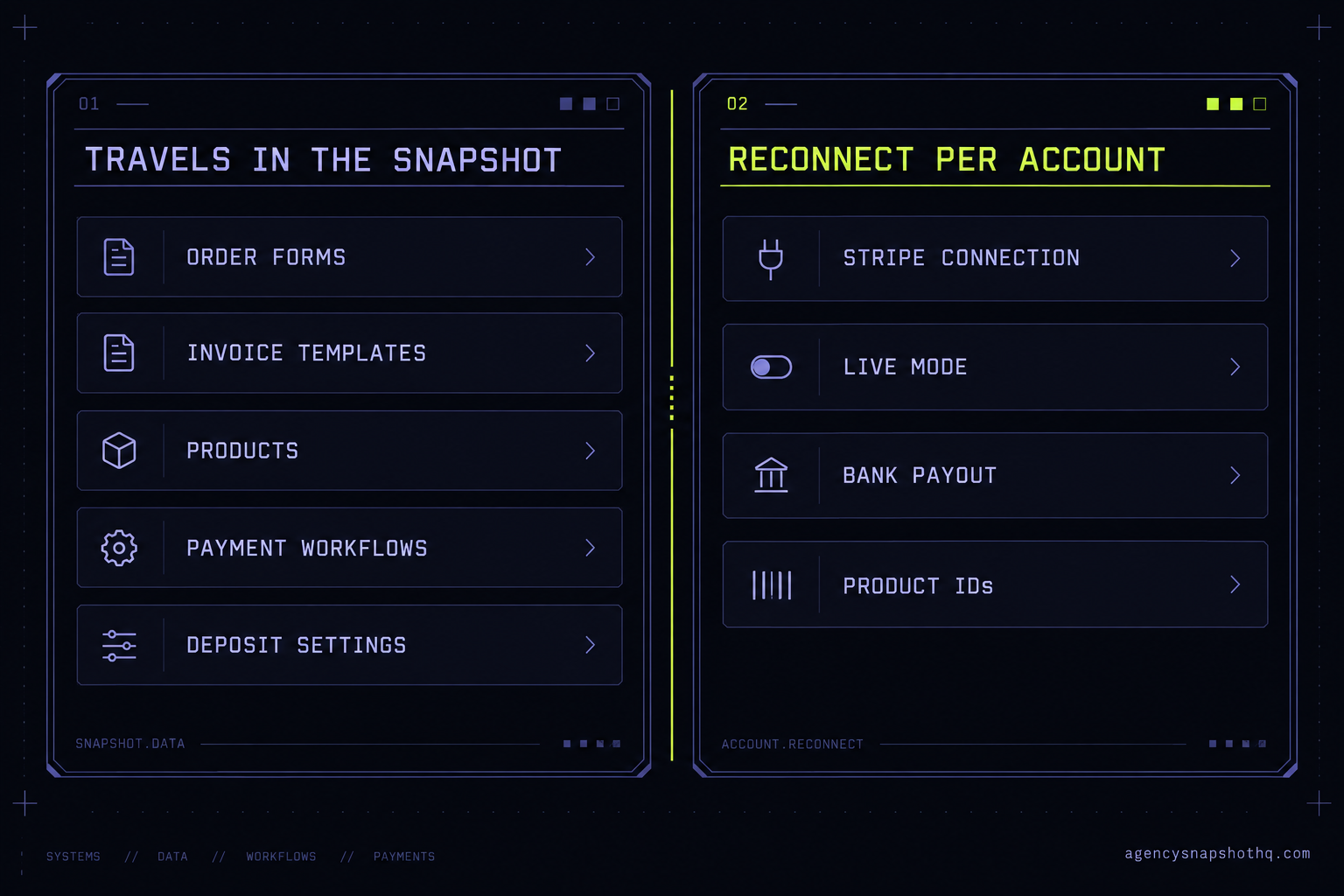
- A snapshot carries the payment surfaces (order forms, invoice and estimate templates, products, and the workflows that send payment links), but it does not carry the Stripe connection behind them. The connection lives on the sub-account and has to be made fresh in every account you install into.
- Whose Stripe connects is the decision that matters. The client's own Stripe connects to the client's sub-account. If you connect your agency Stripe to a client account to 'test it quickly', their customers pay you, and untangling that later is a reconciliation and liability problem, not a settings change.
- The quiet killer is Test mode. A payment layer tested with Stripe test keys looks like it works, shows transactions, and fires the thank-you workflow, while no money has moved. Flip to Live and run one real charge before you hand it over.
- Products and prices on an imported order form point at IDs created in the builder's account. On import they can resolve to a blank product or the wrong amount, so every priced surface has to be re-checked against products that exist in the new account.
- Stripe's fee is the same whoever installs the build, at 2.9% plus 30 cents on a standard US card. What a broken payment layer loses you is different money: a silently failed recurring charge that nobody follows up is leaked in full until someone notices.
The message came in on a Friday afternoon, the way these always do. A spa client the agency had onboarded two weeks earlier had posted a booking link on Instagram, and a customer trying to pay the deposit said the button did nothing. The owner of the agency pulled up the sub-account, opened the booking calendar, and watched the Pay now step spin and then sit there. The calendar was right. The deposit amount was right. The confirmation workflow was armed and waiting. Everything downstream of the payment was built and correct, which is exactly why it had passed the handover call. The one thing that was not there was a payment provider the surface could actually hand the card to. The snapshot had shipped the entire money layer except the part that touches money.
That gap is the subject of this briefing. It catches good agencies because the payment layer of a snapshot is the one subsystem that looks complete in the builder and is unplugged in reality. You installed the snapshot you chose. The order forms, the invoices, the deposit on the calendar, the workflow that texts a payment link after a quote: all of it came across and all of it reads correctly. Then a real customer tries to pay, and the build you signed off on is the thing that looks broken. This piece walks the whole payment layer end to end: what actually travels in a snapshot, what you connect fresh in every account, which surface to use for which job, and the five places the money quietly stops.
How a snapshot’s payment layer actually connects
Start with the split, because every decision in this briefing turns on it. GoHighLevel keeps the things that describe a payment separate from the thing that processes one. A snapshot carries the descriptions. It does not carry the processor.
What travels inside the snapshot is every surface a customer can pay through. The order forms and the funnels that contain them. The products and their prices. The invoice and estimate templates. The documents and contracts that collect a signature and a card. The deposit setting on a calendar. And the workflows that send a payment link or an invoice at the right moment, the text-to-pay step after a quote, the reminder that nudges an unpaid invoice. All of that is configuration, and configuration is what a snapshot is for. It installs clean and it reads correctly in the builder.
What does not travel is the payment provider connection itself. In GoHighLevel the processor is connected at the sub-account level, under the account’s Payments settings, where you link a provider such as Stripe through a Connect with Stripe button that sends you to Stripe to authorise the link and returns you to the account. That authorisation is an external credential tied to one specific Stripe account and one specific sub-account, and like every other external connection in the platform it is not part of the snapshot. The same is true of the Google, Facebook and domain connections, and for exactly the same reason: a snapshot is a template, and a live credential is not a template. So a freshly installed snapshot arrives with every payment surface present and no processor behind any of them. The third-party setup guides all describe the same path, Payments then Integrations then Connect with Stripe, done once per account by someone with admin access to both the sub-account and the Stripe account.
The order the money moves
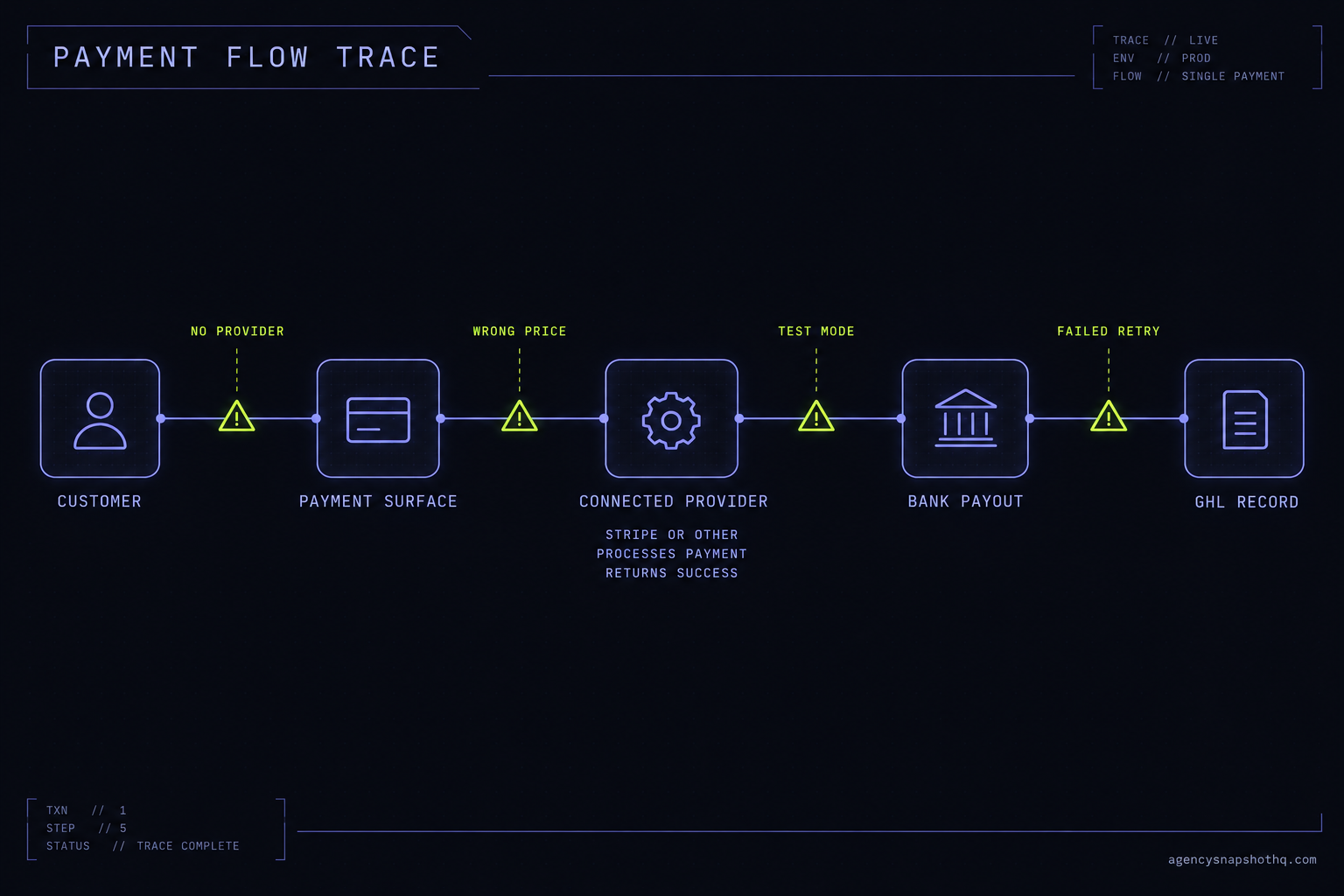
Once a provider is connected, a single payment runs through a fixed chain, and knowing that chain is how you find the break later. A customer lands on a surface, an order form or an invoice or a deposit step. The surface hands the amount and the customer’s card to the connected provider. Stripe charges the card and, if it clears, the funds settle to the bank on that Stripe account. Stripe tells GoHighLevel the charge succeeded, GoHighLevel records the transaction against the contact, and that record is the event your automation listens for, so the thank-you email, the pipeline move and the receipt all fire from it.
Two settings decide whether that chain carries real money. The first is the Live and Test toggle on the provider. Stripe issues two sets of keys, live and test, and a connection made in Test mode runs the entire chain end to end without ever touching a real card or a real bank. The second is the currency, which is set by the connected Stripe account, not by the product. A product priced at 100 in a snapshot built for a US business is 100 in whatever currency the connected Stripe account settles in. Both settings are invisible from the surface itself, which is precisely why both of them show up in the failure list below.
The surfaces, and which job each one is for
The reason a snapshot carries so many payment surfaces is that a local business collects money in more than one shape, and GoHighLevel gives each shape its own tool. An order form inside a funnel is for a fixed, productised purchase a customer chooses themselves. An invoice, which can be sent once or on a recurring schedule, is for work you have quoted and now bill. Text-to-pay is an invoice delivered as a link in a text, which is how a home-services business collects on the spot at the end of a job. A deposit on a calendar holds a slot by taking a partial payment at booking, which is the spa and the clinic case. Estimates and contracts collect a signature and a payment together, which is the retainer case for a law firm or a consultant. A good niche snapshot wires the surface that matches the trade: text-to-pay and deposits for a trade like an HVAC contractor, booking deposits and treatment invoices for a dental practice. Every one of those surfaces, though, is still just a description until a processor is connected and switched to Live.
Where the money layer breaks on import
Five failures account for almost every payment problem on a freshly installed snapshot. They are listed in the order you should check them, because the earlier ones are both more common and faster to rule out.
The processor was never connected
This is the Friday-afternoon spa. The snapshot installed its surfaces, and because the processor connection does not travel, the new account has no provider linked at all. What the customer sees depends on the surface: an order form may show the product and then error at the pay step, an invoice may send with a link that opens to nothing, a deposit calendar may let the slot be chosen and then stall. What you see in the account is a Payments area with no connected provider, or a provider that shows as disconnected. The fix is the reconnect: open the sub-account’s Payments settings, connect the client’s own Stripe, and the surfaces that were already built light up. Nothing about the snapshot needs rebuilding. It was waiting for the one credential a template cannot hold.
The products point at an account that no longer exists
Even with a processor connected, an order form can load wrong. Order forms and funnels reference products by their internal IDs, and those IDs were created in the account the snapshot was built in. In your new account those records do not exist, so the surface can resolve to a blank product slot, a zero amount, or a price left over from the build that is not the price you agreed with the client. The symptom is a form that technically works and bills the wrong thing, which is more dangerous than one that visibly fails, because it can take a real payment for the wrong amount before anyone notices. The fix is to recreate the products in the destination account and repoint every priced surface at them, then confirm each amount on the live surface rather than in the editor.
The provider is live in the builder and still in Test mode here
Stripe’s two sets of keys are the quiet killer. A payment layer connected in Test mode runs the whole chain, shows a transaction, and fires the confirmation workflow, so from the surface and from the automation it looks exactly like success. No money has moved. The reverse bites too: a provider left half-configured can sit in a state where live cards decline while test cards clear. The symptom is transactions that appear in the test view and never in the live view, or a client who reports that their own card was declined on their own form. The fix is to confirm the provider is switched to Live, then prove it the only way that counts, which is a real charge described in the objections below. A Test-mode success is not evidence of anything except that the wiring downstream of the payment is correct.
The wrong Stripe is connected
This one is not a platform glitch. It is a shortcut that becomes a liability. Connecting a processor means logging into a Stripe account, and the fastest Stripe account to reach is usually your own agency’s. Connect that to a client’s sub-account to “just test it”, forget to swap it, and every payment the client’s customers make settles into the agency’s bank instead of the client’s. Now you are holding money that is not yours, your books and the client’s books both disagree with reality, and fixing it means refunding or transferring real customer payments rather than changing a setting. The rule that prevents all of it is simple and absolute: the client’s own Stripe connects to the client’s own sub-account, and the agency’s Stripe never touches a client account. The only account your agency Stripe belongs on is your agency’s own, for your own billing. If you handle a client’s connection for them during setup, you are logging into their Stripe with their permission, not substituting yours.
A recurring charge fails and nobody is listening
The first four failures are visible on day one. This one surfaces in month three. A client on a recurring invoice or a subscription has a card expire, a bank decline a renewal, or a payment simply fail, and unless something is built to catch it, the charge fails silently. The surface does not complain because no customer is sitting in front of it. The money just does not arrive. The symptom is revenue that drifts below what the active subscriber count says it should be, noticed late, if at all. The fix is a failed-payment path: Stripe’s own retry schedule on recurring charges, plus a GoHighLevel workflow that listens for the failed-payment event and raises it as a task and a message to someone who will act. A snapshot built by someone who has run payments in anger includes that path. A snapshot built to demo well often does not, because a demo never has a card expire.
The fees a snapshot can’t change, and the ones it can lose you
There are two kinds of money in this layer. There is the processing fee, which is fixed and which no snapshot and no agency can alter. And there is the money a broken layer leaks, which is the money worth caring about.
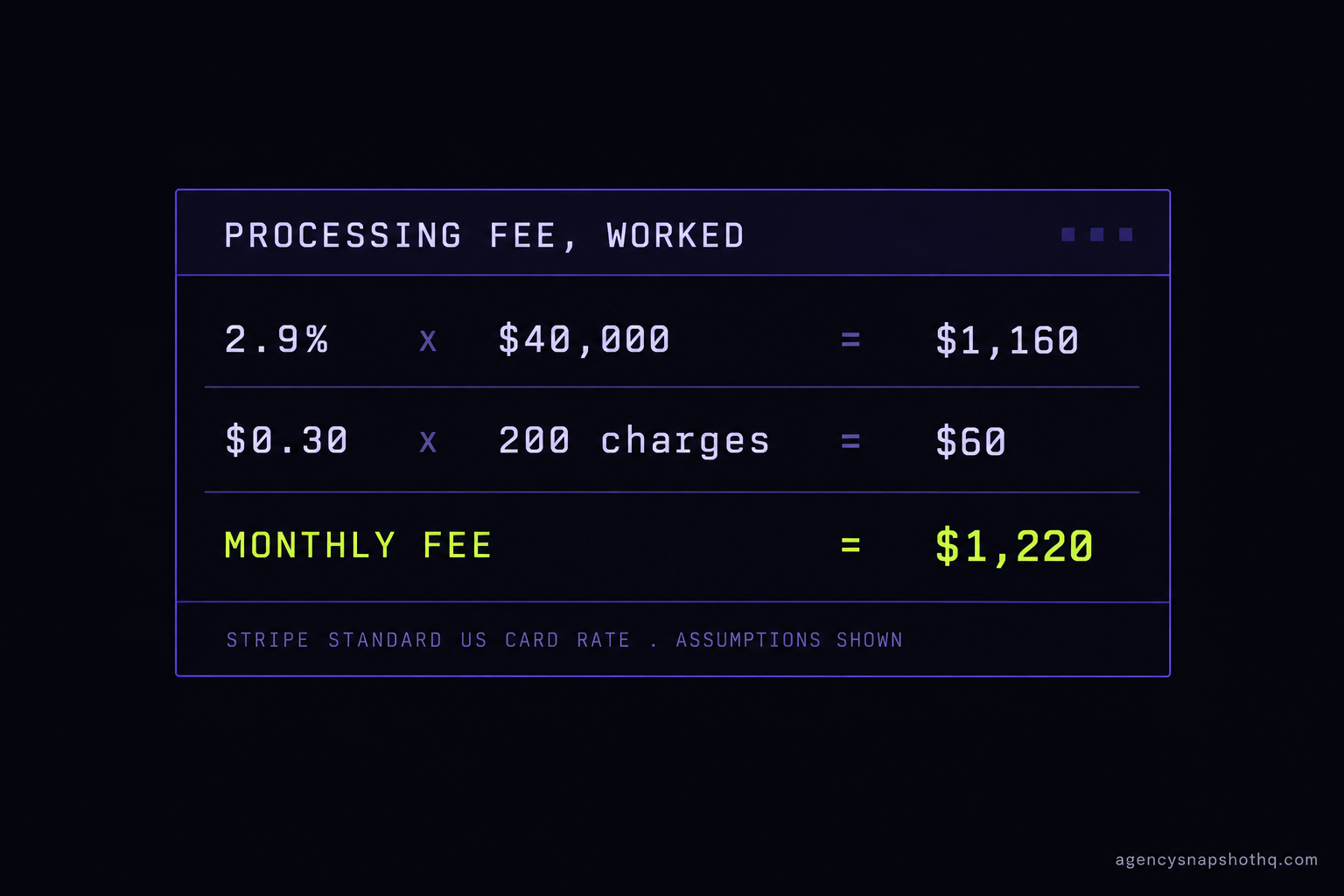
The processing fee first, so it is off the table. Stripe’s published US rate for a standard domestic online card is 2.9% plus 30 cents per successful charge, with roughly 1.5% added for international cards and about 1% more when a currency conversion is required, and bank-debit ACH at 0.8% capped at 5 dollars. Those figures are listed on Stripe’s pricing page and are consistent across independent write-ups such as NerdWallet’s breakdown; both were confirmed by search this run rather than fetched directly, because Stripe’s own page geo-redirects automated readers. On top of that, the integration guides report that GoHighLevel itself adds no transaction fee for a Stripe-connected payment, so the platform cut on the charge is zero and the fee is Stripe’s alone.
Put real numbers through it, with the assumptions printed so you can substitute your own. Take a home-services client billing 40,000 dollars a month in card-paid invoices across about 200 separate charges. The Stripe fee is 2.9% of 40,000, which is 1,160 dollars, plus 30 cents times 200 charges, which is 60 dollars, for 1,220 dollars a month in processing. That number is identical whether the client built the account alone, you installed a free snapshot, or a crew deployed the whole thing. It is a cost of accepting cards, not a cost of the build.
The money a snapshot actually moves is the leaked kind. A recurring charge that fails silently, as in the fifth failure above, is not a fee, it is the entire charge gone until someone catches it: a 300-dollar monthly subscription that quietly stops is 300 dollars a month leaking, and across even a handful of clients that is the cost of a staff hire, lost to a build that skipped the failed-payment path. Disputes are the other leak. Stripe applies a dispute fee, commonly 15 dollars, that it does not return even when you win the dispute, per the fee schedule on Stripe’s pricing page; a review-timing and deposit setup that cuts chargebacks is money kept, and one that invites them is money gone twice, the refund and the fee. None of that is invented performance. It is arithmetic on published rates, and the only variable the build controls is how many charges succeed, how few are disputed, and whether a failure is ever noticed.
The objections worth answering before you ship
“Payments are the client’s job. They own the Stripe account, so they connect it.” They do own it, and in the end they should hold the credential. But the thing a customer hits on day one is the surface you shipped, not the Stripe account behind it. If the deposit button on the calendar you installed does nothing, the client does not file that under “I never connected Stripe”, they file it under “the system the agency built is broken”. Walking the client through connecting their own processor, or doing it with them on the handover call, is a twenty-minute step that decides whether your build’s first impression is working or broken. Own the outcome even though they own the account.
“I will test it live later, the test charge already worked.” A test charge working is the trap, not the reassurance. Test mode runs the whole chain without moving money, so a green test proves only that the wiring downstream of the payment is sound, which was never the part in doubt. The part in doubt is whether a real card settles to the client’s real bank, and the only thing that proves it is one real charge in Live mode, through the exact surface a customer uses, confirmed in the client’s Stripe and refunded. Twenty minutes before handover against a client discovering it broken in front of their own customer is not a close call.
“Then why buy a snapshot with payments built in at all, if I still have to connect the processor myself?” This is the fair one, and the honest answer is that no snapshot from anyone, ours included, can carry a live Stripe connection, because a live credential is not a template and the platform will not let it travel. What a built payment layer saves you is everything except that one connection: the surfaces wired to the right job for the trade, the products laid out, the text-to-pay and deposit steps in place, and the failed-payment path already built so month three does not leak. The connection is a single honest step we never pretend away. When we install a snapshot from the library the installation is free, and the 12 hours of dedicated support, to be used within 10 days of purchase, cover exactly this kind of account-level wiring, rebranding and setup. The part that is genuinely separate, deeper third-party and custom integration work beyond connecting a standard provider, is scoped and quoted on its own through agency systems integration rather than folded in, because pretending that work is free is how builds end up half-wired.
“Can I just use Authorize.net or PayPal and skip Stripe?” You can; GoHighLevel supports more than one provider, and the choice should follow how the client’s customers actually pay. The wiring logic in this briefing does not change with the provider. Whichever you connect still lives on the sub-account, still does not travel in the snapshot, still has a live and a test state, and still has to be proven with one real charge before handover. The processor is a variable. The discipline is not.
The whole payment layer, then, is one honest split restated five ways. The snapshot carries what a template can carry, and you connect what only a live account can hold. Get the connection right, prove it with real money once, and the build you signed off on is the build the customer meets. For how that step sits inside a full account stand-up, the white-glove onboarding sequence places it where it belongs, and the library and plans show what ships already wired to the point where only that connection remains.